Subscription Plans
Understand Kuviq subscription tiers and features.
Overview
Kuviq offers flexible subscription plans to fit organizations of all sizes:
- Free Trial - Try all features before committing
- Starter - For small teams getting started
- Professional - For growing organizations
- Enterprise - For large organizations with advanced needs
Plan Comparison
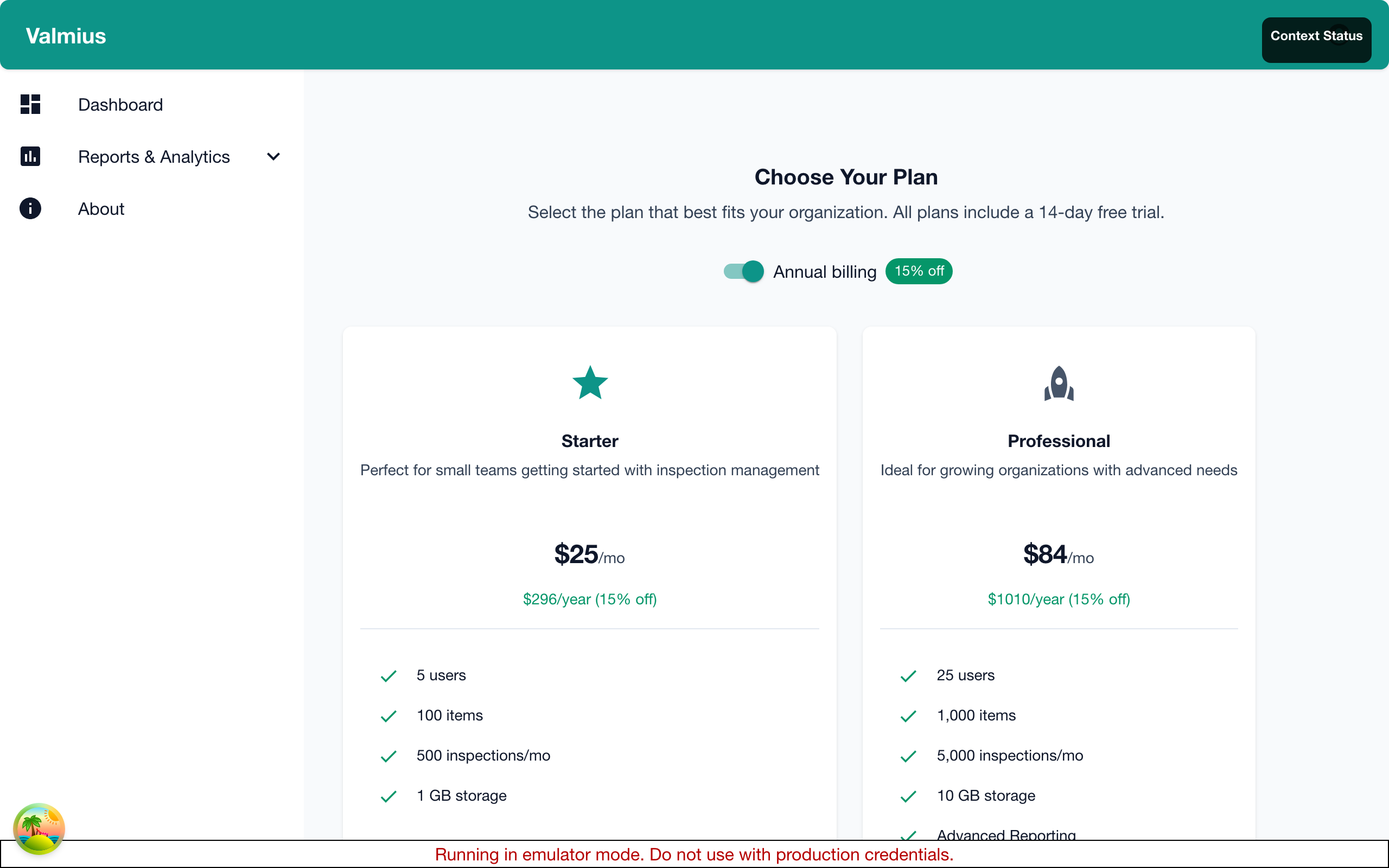
Feature Comparison
| Feature | Starter | Professional | Enterprise |
|---|---|---|---|
| Items | Up to 50 | Up to 500 | Unlimited |
| Users | Up to 5 | Up to 25 | Unlimited |
| Locations | Up to 5 | Unlimited | Unlimited |
| Inspection Templates | 5 | Unlimited | Unlimited |
| Custom Fields | Basic | Full | Full |
| QR Code Generation | Yes | Yes | Yes |
| Photo Documentation | Yes | Yes | Yes |
| Basic Reports | Yes | Yes | Yes |
| Advanced Reports | No | Yes | Yes |
| Scheduled Reports | No | Yes | Yes |
| Corrective Actions | Basic | Full | Full |
| API Access | No | Yes | Yes |
| Custom Integrations | No | No | Yes |
| Priority Support | No | Yes | Yes |
| Dedicated Support | No | No | Yes |
| Custom Training | No | No | Yes |
| SLA Guarantee | No | No | Yes |
Limits Summary
| Limit | Starter | Professional | Enterprise |
|---|---|---|---|
| Items | 50 | 500 | Unlimited |
| Users | 5 | 25 | Unlimited |
| Locations | 5 | Unlimited | Unlimited |
| Templates | 5 | Unlimited | Unlimited |
| Storage | 5 GB | 50 GB | Unlimited |
Plan Details
Starter Plan
Best for: Small teams, single locations, getting started.
Includes:
- Track up to 50 items
- 5 team members
- 5 locations
- 5 inspection templates
- QR code scanning and printing
- Photo documentation
- Basic reporting
- Email support
Use cases:
- Small businesses
- Single location operations
- Trial users ready to commit
- Basic compliance needs
Professional Plan
Best for: Growing teams, multiple locations, advanced needs.
Includes everything in Starter, plus:
- Track up to 500 items
- 25 team members
- Unlimited locations
- Unlimited inspection templates
- Advanced reporting and analytics
- Scheduled report delivery
- Full corrective action workflow
- API access for integrations
- Priority email and chat support
Use cases:
- Multi-site operations
- Growing organizations
- Compliance-focused industries
- Integration requirements
Enterprise Plan
Best for: Large organizations with complex requirements.
Includes everything in Professional, plus:
- Unlimited items
- Unlimited users
- Custom integrations
- Single Sign-On (SSO)
- Advanced security features
- Dedicated account manager
- Custom training and onboarding
- Service Level Agreement (SLA)
- Custom feature development
Use cases:
- Large enterprises
- Regulated industries
- Complex integration needs
- High-volume operations
Choosing the Right Plan
Consider Your Needs
Ask yourself:
- How many items? - Count equipment you'll track
- How many users? - Count team members needing access
- How many locations? - Count physical sites
- Reporting needs? - Basic or advanced analytics?
- Integration needs? - Need API or custom integrations?
- Support needs? - Standard or priority support?
Growth Planning
Plan for growth:
- Start with current needs
- Consider 12-month projection
- Upgrade is easy; just change plans
- No penalty for starting smaller
Common Scenarios
| Scenario | Recommended Plan |
|---|---|
| Just trying Kuviq | Free Trial → Starter |
| Small team, one site | Starter |
| Multiple sites, growing | Professional |
| Enterprise compliance | Enterprise |
| Need integrations | Professional or Enterprise |
| Heavy inspection volume | Professional or Enterprise |
Free Trial
Trial Details
- Duration: 14 days
- Access: Full feature access (Professional level)
- Limits: 50 items, 10 users
- Credit card: Not required to start
- Extension: Available upon request
After Trial
Options when trial ends:
- Subscribe - Choose a paid plan
- Extend - Request trial extension
- Pause - Data retained for 30 days
- Export - Download your data
Trial to Paid Transition
- Go to Admin > Subscription
- Click Subscribe
- Select plan
- Enter payment information
- Confirm
Your data transfers seamlessly.
Upgrading Your Plan
When to Upgrade
Upgrade when:
- Approaching item or user limits
- Need features from higher tier
- Growing to more locations
- Requiring advanced reporting
- Needing API access
How to Upgrade
- Go to Admin > Subscription
- Click Upgrade on the plan you want
- Select billing cycle (Monthly or Annual) if changing
- Review changes and pricing
- Confirm
Upgrade Billing
- Immediate access - New features available right away
- Prorated billing - Pay difference for current period
- Billing cycle preserved - Your current billing cycle (monthly/annual) is maintained unless you change it
- Next period - Full new plan price at your selected billing cycle
Downgrading Your Plan
When to Downgrade
Downgrading may be appropriate if:
- Team size decreased
- Item count reduced
- Feature needs changed
How to Downgrade
- Contact support or go to Admin > Subscription
- Click Change Plan
- Select lower tier
- Review implications
- Confirm
Downgrade Considerations
Before downgrading, verify:
- Item count fits new limits
- User count fits new limits
- Location count fits new limits (Starter)
- You won't need removed features
What Happens
- Takes effect at next billing cycle
- Access continues until then
- Features may become read-only
- Data is preserved within limits
Billing Cycles
Kuviq offers two billing options: monthly and annual. You can switch between them at any time.
Monthly Billing
- Billed: Every month on the same date
- Flexibility: Maximum flexibility - cancel or change anytime
- Cost: Standard monthly rate
- Best for: Organizations that prefer month-to-month commitment
Annual Billing
- Billed: Once per year on your subscription anniversary
- Savings: 15% discount compared to monthly billing
- Commitment: 12-month commitment
- Best for: Stable organizations looking to save money
- Example: If monthly is $99/month, annual is $1,008/year (saves $180/year)
Switching Billing Cycles
You can change your billing cycle at any time:
- Go to Admin > Subscription
- Find your current plan card
- Use the Billing Cycle toggle to switch between Monthly and Annual
- Review the pricing change
- Confirm the switch
What happens when you switch:
- Monthly → Annual: You'll be charged a prorated amount for the remaining time in your current billing period, then switch to annual billing
- Annual → Monthly: Your subscription will switch to monthly billing at the end of your current annual period, or you can switch immediately with proration
Proration:
-
When switching cycles mid-period, you'll be charged or credited a prorated amount
-
This ensures you only pay for the time you use at each billing rate
-
Monthly → Annual: Takes effect immediately
-
Annual → Monthly: Takes effect at renewal
Special Offers
Non-Profit Discount
Non-profit organizations may qualify for:
- 20% discount on any plan
- Contact support with proof of status
Volume Discounts
For very large deployments:
- Enterprise plan with custom pricing
- Contact sales for quotes
Partner Programs
Technology partners and resellers:
- Special partner pricing
- Contact partnership team
Comparing Plans In-App
Plan Comparison Page
- Go to Admin > Subscription
- Click Compare Plans
- View side-by-side comparison
- See current usage vs limits
Usage vs Limits
See how your usage compares:
- Current items vs limit
- Current users vs limit
- Storage used vs limit
Frequently Asked Questions
Can I change plans anytime?
Yes, upgrade anytime. Downgrades take effect at next billing cycle.
What happens if I exceed limits?
You'll see warnings. Upgrade to continue adding items/users.
Is there a contract?
Monthly plans: No contract, cancel anytime. Annual plans: 12-month commitment with savings.
Can I export my data?
Yes, you can export all data at any time.
What payment methods are accepted?
Credit cards (Visa, MasterCard, Amex), debit cards. Enterprise: invoicing available.