Manufacturers
Manage equipment manufacturers in Kuviq.
Overview
Manufacturers help you track the source of your equipment:
- Identify equipment brands and origins
- Track warranty and service information
- Organize equipment by manufacturer
- Contact support when needed
- Link to item types for filtering
Accessing Manufacturers
- Navigate to Admin > Manufacturers
- View all configured manufacturers
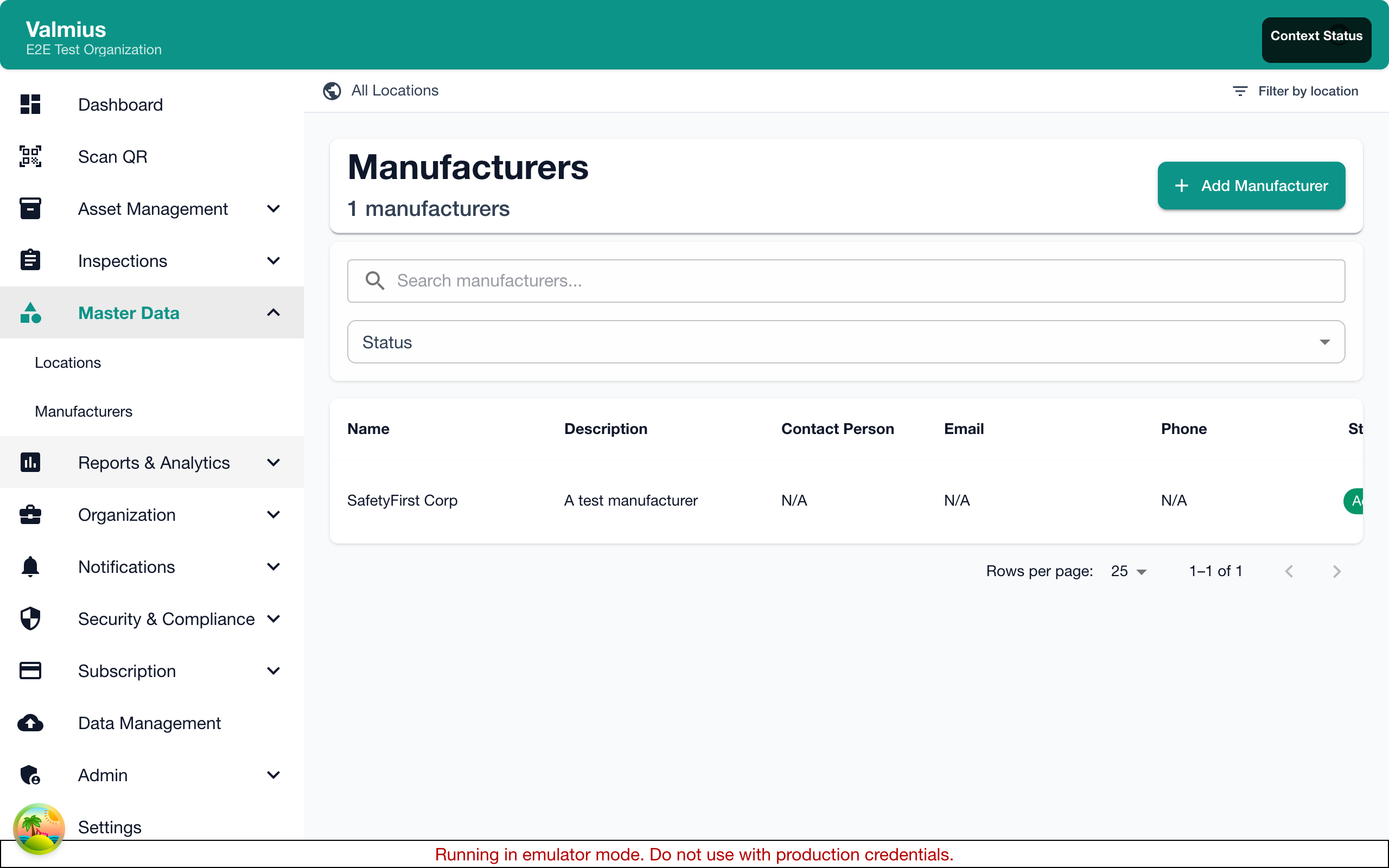
The Manufacturer List
The list shows:
| Column | Description |
|---|---|
| Name | Company/brand name |
| Items | Number of items from this manufacturer |
| Contact | Primary contact information |
| Website | Manufacturer's website |
Adding a Manufacturer
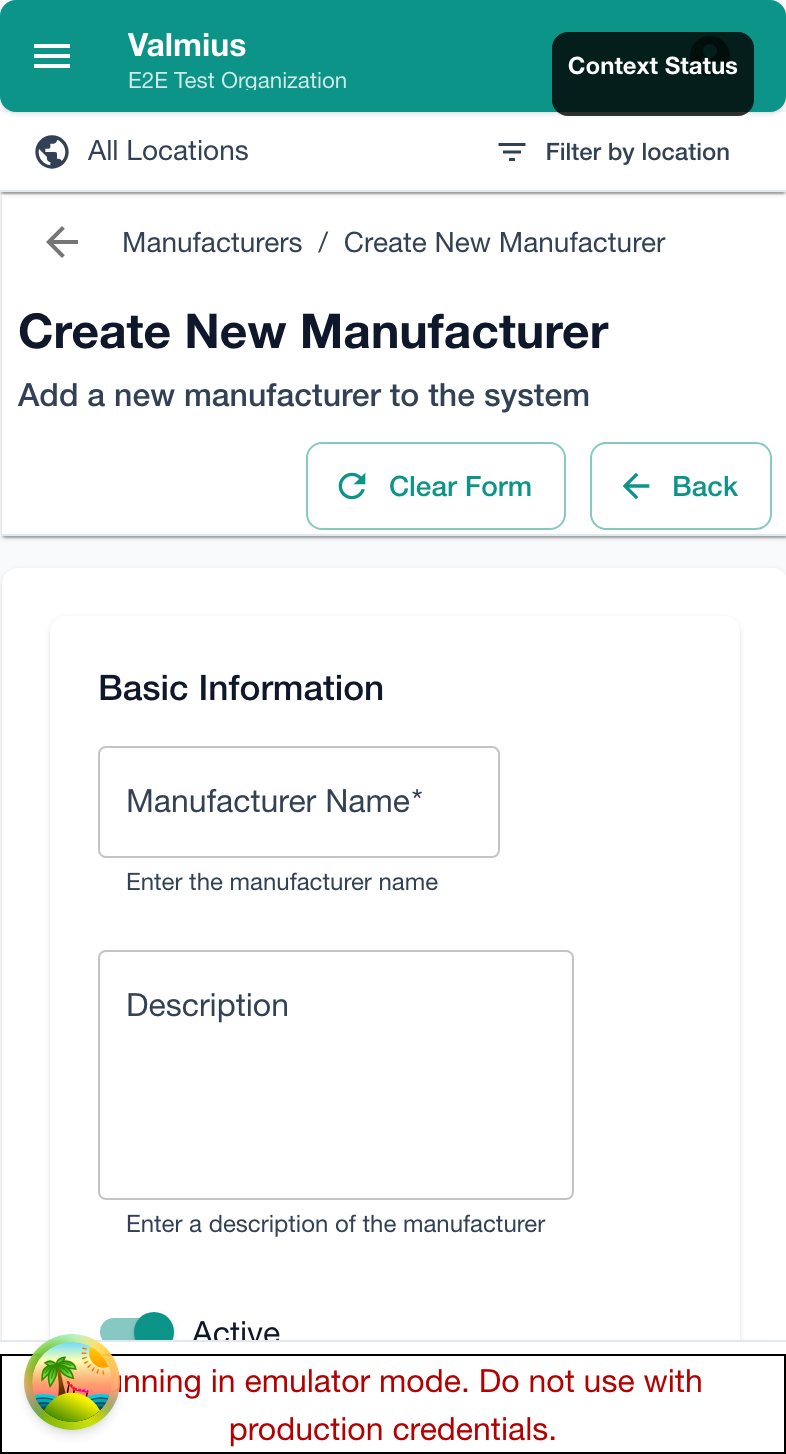
Basic Setup
- Click Add Manufacturer
- Enter the manufacturer name
- Save
Full Details
Add comprehensive information:
| Field | Description |
|---|---|
| Name | Company name (required) |
| Website | Manufacturer's website URL |
| Phone | Support phone number |
| Support email address | |
| Address | Physical address |
| Notes | Warranty info, account numbers, etc. |
Example Entry
Name: SafetyFirst Equipment Inc.
Website: https://safetyfirst.example.com
Phone: +1 (555) 123-4567
Email: support@safetyfirst.example.com
Address: 123 Industrial Way, City, State 12345
Notes:
  - Authorized dealer: ABC Supply
  - Warranty: 5 years standard
  - Account #: SF-12345
Using Manufacturers
Assigning to Items
When creating or editing items:
- Select the manufacturer from the dropdown
- The manufacturer is recorded with the item
- Use this for filtering and reporting
Linking to Item Types
Associate manufacturers with item types:
- Go to Admin > Item Types
- Edit an item type
- Under Manufacturers, select applicable manufacturers
- Save
When creating items of that type, only linked manufacturers appear.
Filtering by Manufacturer
In the items list:
- Click Filter
- Select one or more manufacturers
- View only equipment from those manufacturers
Manufacturer Information Uses
Warranty Tracking
Store warranty information:
- Warranty period
- Warranty start/end dates
- Claim procedures
- Contact for claims
Service Coordination
Track service contacts:
- Authorized service providers
- Parts ordering information
- Technical support contacts
- Documentation resources
Procurement
Useful for procurement:
- Vendor account numbers
- Pricing agreements
- Order contacts
- Lead times
Editing Manufacturers
Updating Information
- Click on a manufacturer
- Update the information
- Save changes
Changes apply immediately—existing items retain the link.
Merging Manufacturers
If you have duplicates:
- Update items from one manufacturer to the other
- Delete the duplicate
- Or, simply update the name if it was misspelled
Deleting Manufacturers
Prerequisites
Before deleting:
- Reassign items to another manufacturer, OR
- Remove manufacturer assignment from items
Deleting
- Click on the manufacturer
- Click Delete
- Confirm
Cannot Delete
Manufacturers assigned to items cannot be deleted. Reassign or remove assignments first.
Reports by Manufacturer
Generate reports to see:
| Report Type | Insights |
|---|---|
| Equipment Count | How many items per manufacturer |
| Inspection Results | Pass/fail rates by brand |
| Failure Trends | Which brands have more issues |
| Age Analysis | Equipment age by manufacturer |
Creating a Manufacturer Report
- Go to Reports
- Select or create a report
- Filter by manufacturer
- Generate
Import/Export
Importing Manufacturers
- Click Import
- Upload a CSV file with manufacturer data
- Map columns:
- Name (required)
- Website
- Phone
- Notes
- Review and import
CSV Format
Name,Website,Phone,Email,Notes
"SafetyFirst Inc.",https://safetyfirst.example.com,555-1234,support@sf.example.com,"5 year warranty"
"EquipCo",https://equipco.example.com,555-5678,help@equipco.example.com,"Authorized dealer: ABC Supply"
Exporting Manufacturers
- Click Export
- Choose format (CSV or Excel)
- Download
Best Practices
Naming Conventions
| Good | Avoid |
|---|---|
| Kidde Fire Safety | Kidde |
| 3M Safety Products | 3M |
| Brady Corporation | Brady |
Use full, official names for clarity.
Information to Track
Always include:
- Full company name
- Website
Include if available:
- Support phone/email
- Account numbers
- Warranty details
Organization
- Avoid duplicates - Search before adding new
- Use consistent names - Match official company names
- Keep notes current - Update warranty and contact info
- Link to item types - For filtered dropdowns
Common Manufacturers by Industry
Fire Safety
- Kidde
- Ansul
- Amerex
- Buckeye Fire
- Badger Fire Protection
Construction
- Werner
- Louisville Ladder
- DeWalt
- Hilti
- 3M Fall Protection
Fleet/Vehicles
- Ford
- Chevrolet
- Toyota
- Freightliner
- International
Troubleshooting
Can't Find Manufacturer
- Check for spelling variations
- Search by partial name
- May need to add as new
Can't Delete Manufacturer
- Items still assigned
- Check items list filtered by manufacturer
- Reassign or remove from items first
Duplicate Manufacturers
- Decide which to keep
- Update items to use correct one
- Delete the duplicate
Next Steps
- Item Types - Link manufacturers to types
- Creating Items - Assign manufacturers
- Item Details - View manufacturer on items